Native on your Apple Watch.
Livona runs as a native Apple Watch app. Track from your wrist and see how long it has been since recent events.


Use Livona on your iPhone, glance at widgets and follow running timers through Live Activities. The native Apple Watch app brings quick tracking and recent events to your wrist. Use Siri commands and Apple Shortcuts to fit tracking into your routines.
Download on theApp Store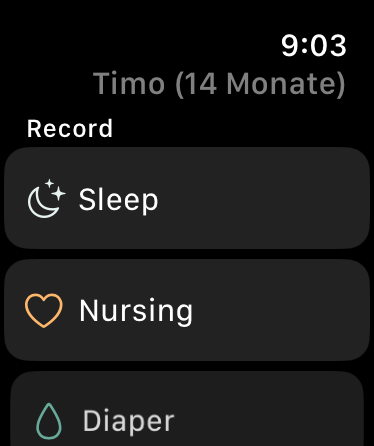
The Watch app offers a compact set of tracking actions. It is useful when your phone is in another pocket and you want to capture a moment while it is happening.
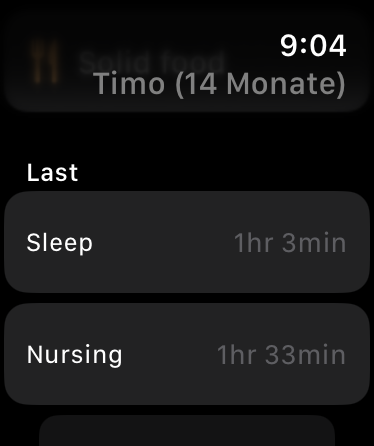
The recent-events screen shows elapsed time for recorded moments. It complements the Today screen on iPhone, keeping the same everyday questions close.
Android and Wear OS are not currently available. Android is planned for a later release.
A glance, a tap or a few words: capture the moment in the way that works for you.
Livona runs as a native Apple Watch app. Track from your wrist and see how long it has been since recent events.
Home Screen and Lock Screen widgets keep the day in view. Use quick tracking actions or check how long it has been since the last feed.
Start and stop sleep, breastfeeding or pumping with your voice. Log diapers, bottles and solid food, too. Combine Livona actions into your own routines in Apple’s Shortcuts app.
Live Activities show how long a tracking session has been running without opening the app. Stop the timer right there. On compatible iPhones, it also stays visible in the Dynamic Island.
“Siri, start sleep in Livona.”
Timers, naps and nights. The sleep clock and weekly view put the hours in context.
Explore featureNursing sides, bottles, pumping, solid food and drinks, with the details that matter.
Explore featureInvite a second caregiver with Premium and continue in the same timeline.
Explore featureLivona is now available for iPhone. Thoughtfully made for the moments that matter.
Download on theApp Store